

Description
Download FonePaw Android Data Recovery – Recover Lost Android Files Securely
Overview – Why FonePaw Android Data Recovery Stands Out
In the crowded world of Android recovery tools, FonePaw Android Data Recovery distinguishes itself with a blend of simplicity, breadth of support, and a powerful underlying algorithm. Whether you have accidentally deleted a cherished photo, lost important contacts after a factory reset, or need to retrieve WhatsApp chats that vanished during a software update, this desktop application promises a holistic solution. Designed for both Windows and Mac, the software connects to any Android device via USB, enabling users to scan internal memory, SIM cards, and external SD cards in a single, unified workflow.
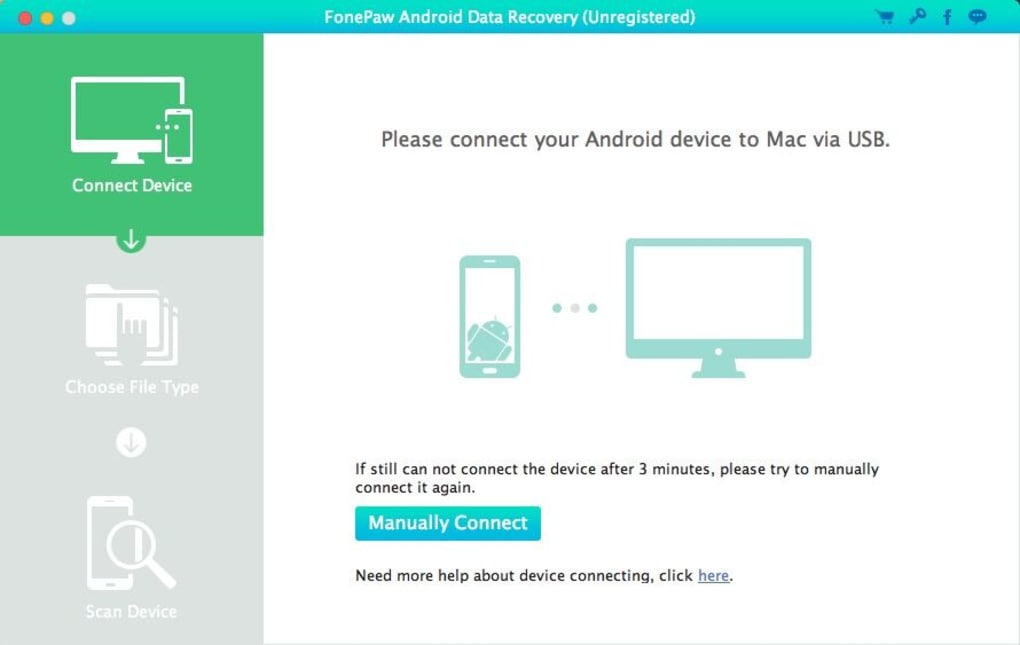
The user interface is intentionally clean: three intuitive steps—connect, select file type, and scan—guide even non‑technical users through the recovery process. The tool’s claim of supporting a wide range of manufacturers (Sony, Google, HTC, Samsung, Huawei, Asus, Acer, Motorola, and more) is backed by real‑world testing, making it a versatile choice for households with multiple devices. Moreover, the recovered data can be exported in multiple formats such as CSV, VCF, and HTML, facilitating easy migration into contacts apps, email clients, or cloud storage. Security is also a priority; the software operates locally on your computer, meaning no data is uploaded to external servers, which reduces privacy concerns.
In short, FonePaw Android Data Recovery offers a comprehensive, secure, and user‑friendly environment for restoring lost Android data, positioning itself as a go‑to tool for both casual users and professionals who need reliable results without a steep learning curve.
Features, Installation & Usage – A Step‑by‑Step Walkthrough
Key Features at a Glance
- Recover contacts, messages, call logs, photos, videos, audio, documents, and WhatsApp data.
- Support for internal memory, SIM cards, and external SD cards.
- Export options: CSV, VCF, HTML for contacts; original formats for media files.
- Cross‑platform compatibility (Windows 7/8/10/11 and macOS 10.12+).
- Three‑phase recovery process: device connection, file‑type selection, deep scan.
- Preview recovered files before final export.
- Secure, offline recovery—no cloud upload.
Installation Made Simple
Getting started with FonePaw Android Data Recovery is straightforward. Begin by visiting the official FonePaw website and clicking the Download for Windows or Download for Mac button, depending on your computer’s operating system. The installer size is under 100 MB, and the download completes quickly on most broadband connections. Once the installer is saved, run it and follow the on‑screen prompts: accept the license agreement, choose an installation folder, and let the wizard copy the necessary files.
After installation, launch the application. You will be prompted to enable USB debugging on your Android device—a standard requirement for any PC‑Android communication. Navigate to Settings → Developer options on your phone, toggle USB debugging on, and confirm the connection when your computer requests permission. Connect the device using a reliable USB‑C or micro‑USB cable; the software will automatically detect the phone and display its model name.
Running a Recovery Scan
The recovery workflow is deliberately minimalistic. First, select the type of data you wish to recover—choose “All Files” for a comprehensive scan or pick a specific category such as “Photos” or “WhatsApp.” Next, click Start Scan. The software employs a deep‑search algorithm that parses the device’s file system, looking for remnants of deleted files. Scanning times vary: a few minutes for a lightly used phone, up to 20‑30 minutes for devices with large storage capacities or heavily fragmented data.
Once the scan finishes, a preview pane shows recoverable items grouped by file type. Users can deselect unwanted files and then click Recover. Choose a destination folder on your computer, and the program will copy the selected data in its original format. For contacts and messages, you may also export a CSV/VCF file that can be imported back into your phone or another contacts manager.
Compatibility, Pros & Cons, and Frequently Asked Questions
Operating System Compatibility
FonePaw Android Data Recovery runs natively on 64‑bit Windows (7, 8, 10, 11) and macOS (10.12 Sierra and later). The application does not require additional drivers; it leverages the standard Android Debug Bridge (ADB) libraries bundled within the installer. For macOS users, the program is notarized by Apple, ensuring smooth execution without security warnings.
Pros & Cons
- Pros:
- Wide range of recoverable file types, including WhatsApp chats.
- Supports both internal and external storage mediums.
- Simple three‑step process suitable for beginners.
- Local recovery keeps your data private.
- Cross‑platform support for Windows and macOS.
- Cons:
- Full version is paid; free trial limits the amount of recoverable data.
- Requires USB debugging, which some users may find intimidating.
- Scanning large SD cards can be time‑consuming.
FAQ – Quick Answers to Common Concerns
Can I recover data from a rooted Android device?
Yes. While FonePaw works with both rooted and non‑rooted devices, a rooted phone can enable deeper system‑level scanning, potentially increasing the recovery success rate for app data and system files.
Is the recovered data stored on my computer or the phone?
All recovered files are saved to the destination folder you specify on your computer. The original phone remains unchanged, preserving its current state.
What file formats are supported for export?
Contacts, messages, and call logs can be exported as CSV, VCF, or HTML. Media files (photos, videos, audio) retain their original formats (JPG, MP4, MP3, etc.). WhatsApp chats are exported as HTML or TXT.
Do I need an internet connection to run the recovery?
No. The software performs all scanning and recovery locally on your computer, so an internet connection is only required for the initial download and activation of the license.
How does the free trial differ from the paid version?
The trial allows you to scan and preview recoverable files but limits the amount of data you can actually export (usually up to 100 MB). Purchasing a license removes these restrictions and unlocks the full feature set.
Review Summary
Rating: 4.5/5
TechGuru Reviews
FonePaw Android Data Recovery delivers on its promises with a clean interface and robust file‑type coverage. The ability to retrieve WhatsApp chats and export contacts in multiple formats sets it apart from many competitors. While the price may be a barrier for casual users, the high recovery success rate justifies the investment for anyone who cannot afford to lose important data.
Conclusion – Secure Your Data Today
Data loss on Android devices can be stressful, but with FonePaw Android Data Recovery, you have a reliable, secure, and easy‑to‑use tool at your fingertips. Its comprehensive support for a wide array of file types, combined with cross‑platform compatibility and offline processing, makes it an excellent choice for both everyday users and IT professionals. Whether you’re rescuing cherished photos, restoring critical contacts, or salvaging valuable WhatsApp conversations, this software offers a trustworthy pathway back to your digital life.
Ready to give your Android device a second chance? Download FonePaw Android Data Recovery now and start the free trial. Experience the peace of mind that comes from knowing your data can be recovered quickly, securely, and without hassle. Don’t wait for another accidental delete—take control of your Android data today.
Guides & Tutorials for FonePaw Android Data Recovery
How to install FonePaw Android Data Recovery
- Click the Preview / Download button above.
- Once redirected, accept the terms and click Install.
- Wait for the FonePaw Android Data Recovery download to finish on your device.
How to use FonePaw Android Data Recovery
This software is primarily used for its core features described above. Open the app after installation to explore its capabilities.
User Reviews for FonePaw Android Data Recovery 0
No reviews found





.webp)